Fiercely committed to our members, our mission, our communities, and each other, every single member of the Kaiser Permanente team is essential to our success. Together, our more than 305,000 dedicated professionals work to advance Kaiser Permanente’s commitment to delivering a healthier tomorrow.
Driven by passion, we strive to take Kaiser Permanente to the next level. With the wellness of our patients and our communities at heart, we work to revolutionize health and care in America and around the world.
Kaiser Permanente Employee Benefits Overview
Kaiser Permanente (KP) invests in its employees’ well-being through a comprehensive Total Rewards program. From health coverage to retirement plans and professional development, KP ensures staff have access to resources that support physical, financial, and mental health.
As employees of Kaiser Permanente, there are many things for us to be proud of! But don’t just take our word for it. Watch our employees talk about the most motivating and rewarding aspects of the KP employee experience. From growth opportunities to great benefits to being encouraged to reach your full potential, find out what awaits when you add your talents — and your voice — to our team.
Kaiser Permanente Employee Benefits Eligibility & Enrollment Requirements
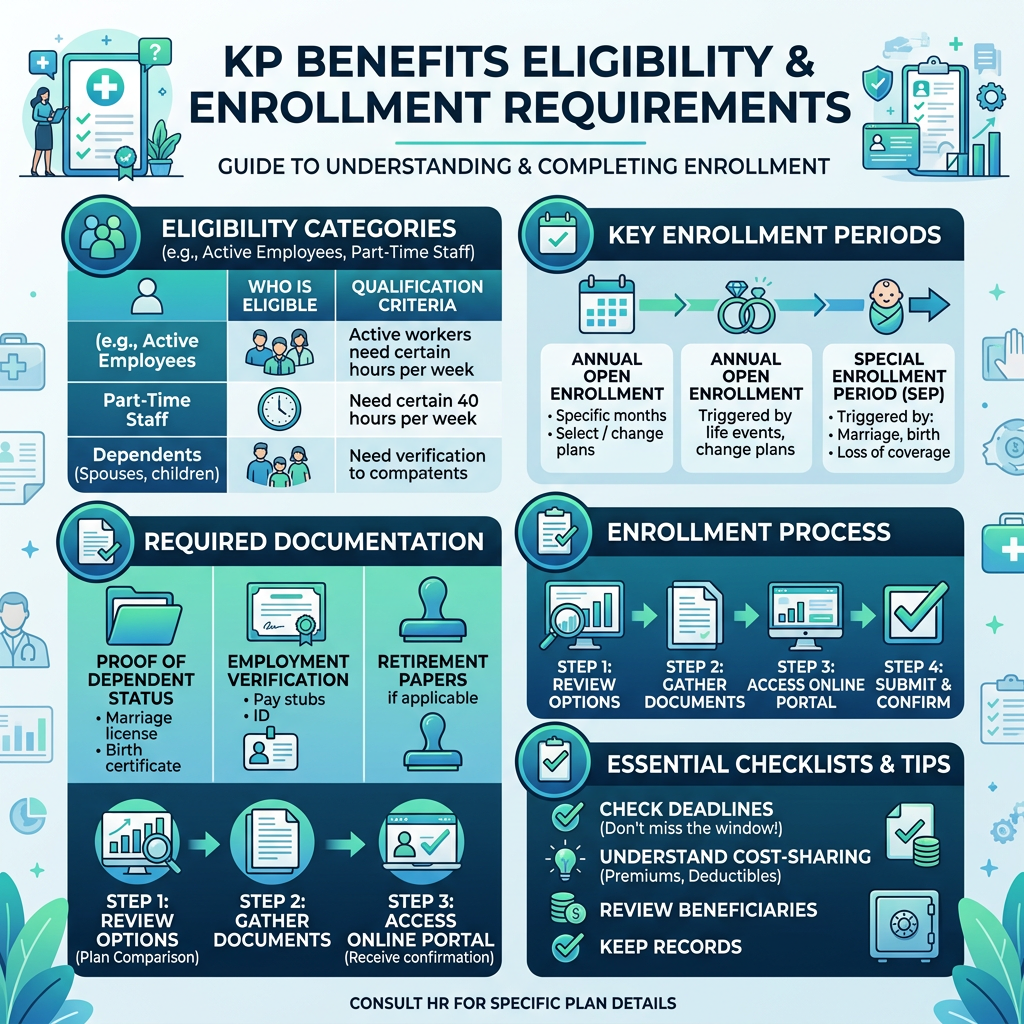
Eligibility for employee benefits at Kaiser Permanente is determined by your employment status, regularly scheduled work hours, and classification at the time of hire. Meeting the minimum hours and active employment requirements ensures access to medical coverage, retirement plans, and the broader Total Rewards program.
Primary Eligibility Requirements
- Minimum Hours: You are generally eligible for most benefits if you are regularly scheduled to work at least 20 hours per week.
- Employment Status: You must be in a regular full-time or part-time position. “Per diem” or temporary employees typically do not qualify for the full benefits package unless they meet specific union-negotiated conversion rules.
- Enrollment Window: New employees must complete their enrollment online via the Kaiser Connect portal within 31 days of their hire date.
KP Employee Benefit Waiting Periods & Activation Schedule
Different Kaiser benefits become active at different stages of your career:
- Immediate (Hire Date): Medical coverage, Paid Time Off (PTO) accrual, and the Tax Sheltered Annuity (retirement savings) plan.
- 3 Months: Dental and disability coverage typically begins on the first of the month following three months of continuous employment.
- 1 Year: Eligibility for the Defined Benefit Pension Plan requires one year of service with at least 1,000 hours worked.
- 2 Years: Participation in supplemental retirement plans (where KP contributes to your account) usually begins after two years of employment.
What to Prepare Before Enrolling in Kaiser Permanente Benefits
- Your NUID: Found on your employee ID badge or your offer letter.
- Dependent Info: If you are enrolling for the first time, have the Social Security numbers and birthdates of your spouse or children ready.
- Verification Docs: For certain benefits, you may need to upload a marriage certificate or birth certificate to the portal.
Kaiser Permanente Employee Benefits
Our employees work hard every day to support our mission. In return, we offer competitive compensation and benefits designed to help our team members and their families stay healthy, meet their financial goals, and generally thrive in and beyond work.
Depending on your position, your compensation and benefits may include:
- Generous Vacation, Holiday & Sick Leave
- Medical (including prescriptions), Vision, Mental Health & Dental Care
- Disability & Life Insurance Coverage
- Educational Opportunities & Tuition Reimbursement
- Wellness & Employee Assistance Programs
- Health Care, Dependent Care & Transit Flexible Spending Account Options
- Retirement Plans
NOTE: Benefits and incentives may vary based on your Kaiser Permanente region, position, scheduled hours, and representation by collective bargaining or employee groups.
How to Enroll and Access Your Kaiser Permanente Employee Benefits
- Navigate to the official KP HRConnect portal to begin the login process. Always use the authorized employee login page to securely manage payroll details, health plan enrollment, retirement benefits, and explore available Kaiser employee discounts.
- Enter your National User ID (NUID) on the KP employee login page; this unique alphanumeric credential is issued at hire and is required for secure access to the MyHR benefits system, Kaiser employee portal, and other internal HR platforms.
- Provide your secure network password to complete the sign-in process; first-time users may need to use a temporary password from a manager or follow the First-Time User registration steps to activate their Kaiser Permanente MyHR login credentials.
- Complete the mandatory Multi-Factor Authentication (MFA) step during the Kaiser Permanente HR portal login; most regions require identity verification through a one-time security code sent via text, email, or an authentication application such as PingID to protect sensitive employee health benefits and compensation data.
- After completing the KP HR login and Multi-Factor Authentication (MFA), navigate to the Benefits or Life Events tile in the Kaiser Connect dashboard to access the Enrollment Wizard.
- Manually select or enroll in each benefit option, including medical, dental, vision, Flexible Spending Accounts (FSA), and retirement plans; logging in alone does not automatically activate coverage.
- For dependent coverage, upload required legal documents such as marriage certificates or birth certificates directly into the KP Connect portal.
- Complete all dependent verification within the 31-day new hire enrollment window to ensure dependents are included; failure to upload documents on time may result in automatic removal from plans.
- At the end of the process, click “Submit” to finalize your benefit elections; without submitting, coverage selections will not be activated.
- Download or print the Benefits Confirmation Statement PDF generated by the system as official proof of enrollment and to safeguard against any system errors or payroll discrepancies.